When you log in to your onlending dashboard, a pop-up prompt will appear for you to enter your settlement account details.
To set it up:
Log in to your onlending dashboard.
Enter your settlement account details (Bank name, Account number and Account name) in the pop-up form.
Click Submit.
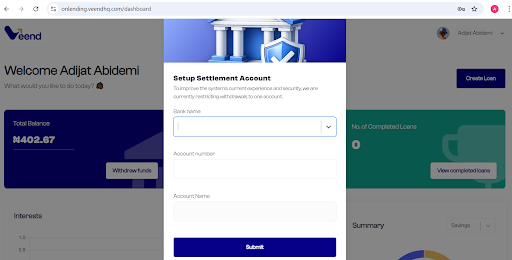
Once this is done, your settlement account has been successfully submitted and saved on your dashboard.
To get started, kindly click on the link, onlending.veendhq.com
Was this article helpful?
That’s Great!
Thank you for your feedback
Sorry! We couldn't be helpful
Thank you for your feedback
Feedback sent
We appreciate your effort and will try to fix the article