Customer account revalidation is a verification process designed to confirm and update customer information. This ensures that all customer records are accurate, secure, and suitable for uninterrupted service delivery. The process also helps protect customer accounts from unauthorised access and fraud.
How the Revalidation Process Works
To begin the revalidation process, customers are required to visit the revalidation portal at:
https://veendhq.com/loans/customer-revalidation
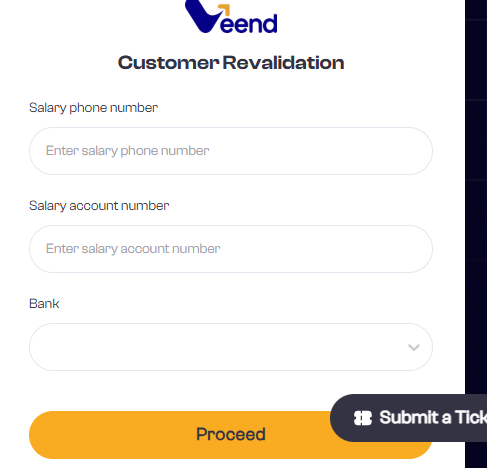
Once the page loads, the customer will be asked to provide the following details:
Salary phone number
Salary account number
Bank name
These details are used to locate and verify the customer’s salary account information in the system.
BVN Verification
As part of the revalidation process, customers may be required to provide their Bank Verification Number (BVN).
If a customer is revalidating for the first time or has not previously added their BVN, they will be prompted to enter their BVN during the process.
If a customer has already added their BVN in the past, this option will not appear again, and the process will continue without requesting it.
The BVN is a unique identification number issued by banks and is used to confirm the customer’s identity and link their bank records securely. This step helps ensure that the account being revalidated truly belongs to the customer.
OTP Verification
After submitting the required details, the system will prompt the customer to receive a verification code. The customer can choose to receive the code through any of the following channels:
Primary phone number
Alternate phone number
Email address
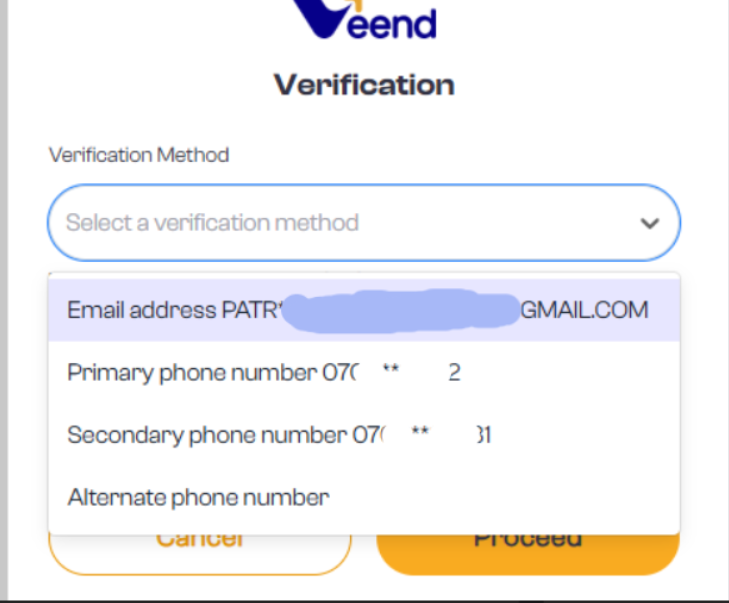
A 6-digit One-Time Password (OTP) will be sent to the selected option within 10 seconds.
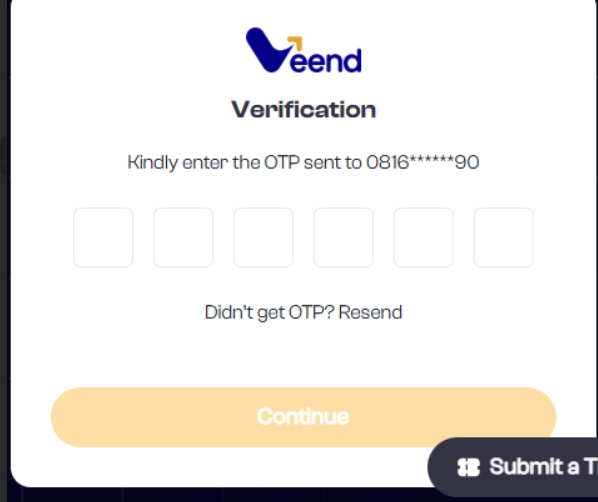
Once the correct OTP is entered, the system automatically completes the revalidation process, and the customer’s account is successfully revalidated.
Was this article helpful?
That’s Great!
Thank you for your feedback
Sorry! We couldn't be helpful
Thank you for your feedback
Feedback sent
We appreciate your effort and will try to fix the article